
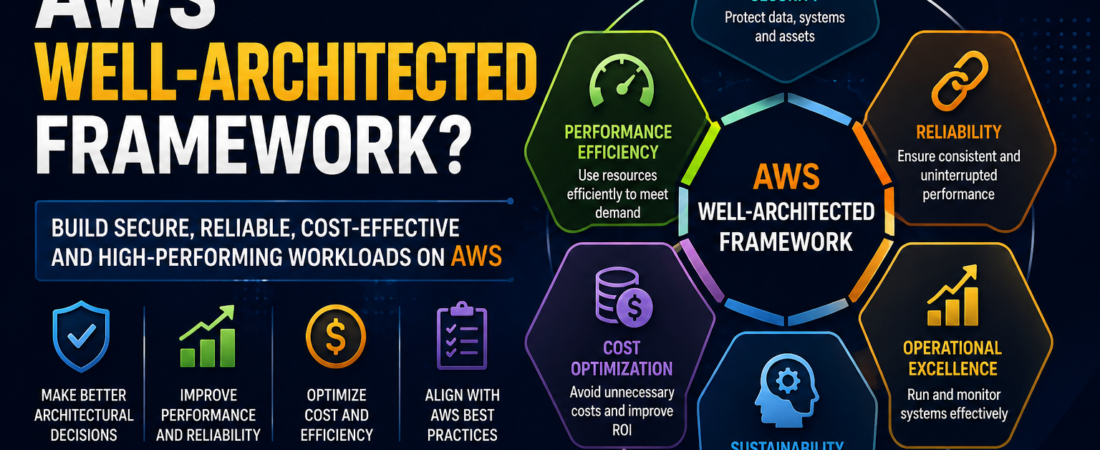
A practical guide to designing secure, reliable, efficient, and cost-effective cloud architectures.
Introduction
The AWS Well-Architected Framework is AWS’s blueprint for building great cloud infrastructure. It’s not just theory — it’s a structured way to evaluate your architecture, identify risks, and implement improvements based on proven best practices.
The framework has 6 pillars, each addressing a fundamental aspect of cloud architecture. AWS also provides a free Well-Architected Tool in the console where you can review your workloads against these pillars and get prioritised recommendations.
In this post, I’ll break down each pillar with practical examples from running production microservices on EKS — the things that actually matter in day-to-day DevOps work.
Quick Reference — All 6 Pillars at a Glance
| # | Pillar | Key Question | Top 3 Actions |
|---|---|---|---|
| 1 | Operational Excellence | “Can we respond to issues quickly?” | IaC, CI/CD, observability |
| 2 | Security | “Is everything protected?” | Least privilege, encryption, detective controls |
| 3 | Reliability | “Will this survive failures?” | Multi-AZ, auto-scaling, backups |
| 4 | Performance Efficiency | “Are we using the right resources?” | Caching, right-sizing, CDN |
| 5 | Cost Optimization | “Are we wasting money?” | Right-sizing, Spot/Savings Plans, lifecycle policies |
| 6 | Sustainability | “Can we reduce our footprint?” | Graviton, serverless, delete unused data |
Pillar 1: Operational Excellence
Focus: Run and monitor systems to deliver business value, and continually improve processes and procedures.
“Can your team detect, respond to, and learn from incidents quickly? Can you deploy changes safely and frequently?”
Key Practices
| Practice | What It Looks Like in Production |
|---|---|
| Infrastructure as Code | All infrastructure managed with Terraform — no manual console changes. Every change is version-controlled, reviewable, and repeatable |
| Small, frequent changes | Deploy small changes frequently via CI/CD pipelines. Reduces risk and makes rollback easier than big-bang releases |
| Runbooks and playbooks | Documented procedures for common incidents. Anyone on the team can execute “how to failover the database” at 3am |
| Observability | Datadog dashboards showing golden signals (latency, traffic, errors, saturation). If you can’t see it, you can’t fix it |
| Automated responses | EventBridge rules that auto-remediate — auto-restart failed tasks, auto-scale on high CPU, auto-alert on anomalies |
| Post-incident reviews | Blameless post-mortems after every significant incident. Document root cause and prevention actions |
| Game days | Regularly simulate failures (chaos engineering) to test operational readiness before real incidents |
| Deployment strategies | Blue/green or canary deployments — limit blast radius of bad releases |
Real-World Example
“We used GitLab CI/CD with Terraform for all infrastructure changes. Every deployment was automated — nobody clicked around in the AWS console. CloudWatch alarms fed into PagerDuty for on-call alerting, and we maintained runbooks in Confluence for every common incident type. After any P1, we ran a blameless post-mortem within 48 hours and tracked action items to completion.”
Pillar 2: Security
Focus: Protect data, systems, and assets through risk assessment and mitigation strategies.
“Is your data encrypted? Are permissions least-privilege? Can you detect and respond to security events?”
Key Practices
| Practice | What It Looks Like in Production |
|---|---|
| Identity and access management | IAM roles with least privilege, IRSA for EKS pods, MFA for console users, no long-lived access keys |
| Detective controls | GuardDuty for threat detection, CloudTrail for API audit, AWS Config for compliance, Inspector for vulnerability scanning |
| Infrastructure protection | Security groups with minimal ports, WAF on ALBs, private subnets for databases, VPC endpoints for AWS services |
| Data protection at rest | KMS encryption on S3, EBS, RDS, DynamoDB — everything encrypted by default |
| Data protection in transit | TLS everywhere — HTTPS at ALB, SSL enforced on DB connections, mTLS between microservices |
| Incident response | Predefined response plan, automated alerting, ability to isolate compromised resources in minutes |
| Security in CI/CD | SAST (SonarQube), container scanning (Trivy), dependency checks, policy enforcement (OPA Gatekeeper) |
| Secrets management | AWS Secrets Manager with automatic rotation. Never hardcode credentials |
| Multi-account strategy | Separate accounts for prod, dev, security using AWS Organizations + SCPs |
Real-World Example
“All EKS pods used IRSA (IAM Roles for Service Accounts) — no shared credentials. GuardDuty ran across all accounts, Inspector scanned ECR images continuously, and WAF protected public ALBs. Secrets lived in Secrets Manager with 30-day auto-rotation. Trivy in the CI pipeline blocked any image with critical CVEs from reaching production.”
Pillar 3: Reliability
Focus: Ensure a workload can recover from failures and meet demand.
“What happens if an AZ goes down? Can you handle a traffic spike? How fast can you recover from failure?”
Key Practices
| Practice | What It Looks Like in Production |
|---|---|
| Multi-AZ deployments | RDS Multi-AZ, EKS nodes spread across 3 AZs, ALB distributes traffic — survive an AZ failure without downtime |
| Multi-region for DR | Aurora cross-region read replicas, S3 cross-region replication, Route 53 failover routing |
| Auto-scaling | HPA in Kubernetes scales pods on CPU/memory. Karpenter scales nodes automatically. Handle spikes without humans |
| Health checks | ALB health checks, Route 53 failover, Kubernetes liveness/readiness probes — unhealthy components removed automatically |
| Backup and restore | Automated RDS snapshots, S3 versioning, DynamoDB PITR. Test restores regularly — untested backups aren’t backups |
| Fault isolation | Bulkhead pattern — separate services so one failure doesn’t cascade. Circuit breakers prevent domino effects |
| Throttling and queuing | SQS queues absorb traffic spikes. API Gateway throttling protects backends from being overwhelmed |
| Chaos engineering | AWS Fault Injection Simulator — test how systems respond to AZ loss, instance termination, network latency |
Real-World Example
“Our search platform ran across 3 AZs with topology spread constraints. RDS was Multi-AZ with automated failover. Auto-scaling handled Black Friday traffic spikes. We ran quarterly DR drills — simulating a region failure, triggering failover, and validating that everything worked. The drill itself often found issues we could fix before a real incident.”
Pillar 4: Performance Efficiency
Focus: Use computing resources efficiently and maintain efficiency as demand and technologies change.
“Are you using the right resource type? Are users getting fast responses? Are you over-provisioned?”
Key Practices
| Practice | What It Looks Like in Production |
|---|---|
| Right-sizing | AWS Compute Optimizer identifies over-provisioned instances. Downsize based on actual metrics, not guesses |
| Choose the right compute | EC2 for long-running, Fargate for bursty, Lambda for event-driven, Spot for interruptible. Match the workload |
| Caching | ElastiCache for hot data, CloudFront for static content, API Gateway caching for API responses |
| Database selection | DynamoDB for key-value, Aurora for relational, OpenSearch for full-text search. Right tool for the job |
| Content delivery | CloudFront CDN serves content from 400+ edge locations — users get responses from the nearest point |
| Async processing | Offload heavy work to SQS/Lambda. Don’t make users wait for operations that can happen in the background |
| Connection pooling | RDS Proxy manages database connections efficiently — prevents connection exhaustion under load |
| Graviton instances | ARM-based processors with up to 40% better price-performance than equivalent x86 instances |
| Load testing | Regular performance tests before peak seasons catch bottlenecks before customers hit them |
Real-World Example
“We cached frequently searched flight/hotel results in ElastiCache — response times dropped from 800ms to under 50ms. CloudFront served all static assets from edge locations. Graviton-based nodes in EKS gave us better performance at lower cost. Regular load testing before peak holiday seasons caught bottlenecks early — we fixed them in staging, not production.”
Pillar 5: Cost Optimization
Focus: Avoid unnecessary costs and understand where money is being spent.
“Are you paying for resources you don’t use? Are you on the right pricing model? Can you attribute costs to teams?”
Key Practices
| Practice | What It Looks Like in Production |
|---|---|
| Right-sizing | Downsize over-provisioned instances based on actual utilisation (Compute Optimizer, Datadog metrics) |
| Savings Plans | 1 or 3 year commitments for stable production workloads — 30-60% discount vs On-Demand |
| Spot instances | CI/CD runners, dev environments, batch jobs — up to 90% cheaper for interruptible work |
| Auto-scaling (scale IN) | Scale down during nights/weekends. Don’t pay for capacity nobody is using |
| Scheduled environments | Shut down dev/staging outside business hours — 65% savings on non-prod compute |
| S3 lifecycle policies | Standard → IA (30 days) → Glacier (90 days) → Deep Archive (1 year). Automatic, set-and-forget |
| VPC endpoints | Avoid NAT Gateway data processing charges ($0.045/GB) by using free Gateway endpoints for S3/DynamoDB |
| Tagging | Tag every resource by team/project/environment. You can’t optimize what you can’t attribute |
| Cost anomaly detection | ML-based alerts on unexpected spend spikes — catch runaway costs within hours, not at month-end |
| Karpenter | Automatically picks cheapest EKS node types, consolidates workloads, removes empty nodes |
Real-World Example
“Switching CI/CD runners to Spot saved 70%. S3 lifecycle policies on log buckets cut storage costs by 80%. Karpenter consolidated EKS workloads onto fewer, cheaper nodes — 30% compute reduction. Dev databases scheduled to stop at 7pm and start at 8am saved 60%. Non-prod kube-downscaler scaling to zero overnight saved another 65% on dev/SIT compute.”
Pillar 6: Sustainability
Focus: Minimize the environmental impact of running cloud workloads.
“Are you consuming more resources than necessary? Could you run the same workload with less energy?”
Key Practices
| Practice | What It Looks Like in Production |
|---|---|
| Right-sizing | Over-provisioned resources waste compute, which wastes energy. Size to what you actually use |
| Graviton processors | ARM-based, more energy efficient per unit of compute than x86 |
| Serverless | Lambda, Fargate, Aurora Serverless — zero resources consumed when there’s no work to do |
| Efficient code | Optimise hot paths in application code. Faster execution = less CPU time = less energy |
| Data lifecycle management | Delete data you don’t need. Less storage = less disk spinning = less energy |
| Region selection | Some AWS regions use more renewable energy (EU Ireland, Canada, Oregon) |
| Managed services | Shared infrastructure (RDS, DynamoDB) is operated more efficiently by AWS than individual dedicated servers |
| Compression | Compress data before storing and transferring — smaller payloads need less processing and storage |
| Carbon footprint tool | AWS Customer Carbon Footprint Tool shows estimated emissions from your usage |
Real-World Example
“Graviton nodes in EKS gave better performance per watt. Lambda for event-driven workloads meant zero compute running when there’s no traffic. S3 lifecycle policies automatically deleted logs nobody would ever read. Serverless where possible meant we only consumed energy when actually processing work.”
How to Apply the Framework in Practice
1. Use the AWS Well-Architected Tool
AWS provides a free tool in the console:
- Create a workload review
- Answer questions about your architecture per pillar
- Get a report with High Risk Issues (HRIs)
- Prioritise and fix the highest-impact items
2. Run a Review Before Major Launches
Before launching a new service to production:
- Does it follow all 6 pillars?
- Is it encrypted, auto-scaling, multi-AZ, observable, tagged, right-sized?
- Missing any = risk that will materialise eventually
3. Embed in Your Culture
- Sprint reviews: “Did any work this sprint improve our Well-Architected posture?”
- Architecture Decision Records (ADRs): Reference which pillar a decision supports
- New service checklist: Must address all 6 pillars before going live
Common Interview Follow-Up Questions
“Which pillar is most important?”
“They’re all important, but if I had to choose: Reliability for customer-facing services (downtime = lost revenue) and Security for data-sensitive workloads (breach = existential risk). Cost optimization matters, but you never sacrifice security or reliability to save money.”
“How do the pillars conflict?”
“Performance and Cost often conflict — the fastest option isn’t the cheapest. Reliability and Cost conflict — Multi-AZ/Multi-Region is expensive. The framework acknowledges trade-offs: you choose the right balance for YOUR workload. A payment service needs extreme reliability (spend more). A batch reporting job can tolerate some failure (save money).”
“How often do you review?”
“Formally: quarterly. Informally: every architecture decision references the pillars. Every post-mortem identifies which pillar was weak. Every new service goes through a lightweight Well-Architected checklist before production.”
Key Takeaway
The Well-Architected Framework isn’t a one-time audit — it’s a way of thinking about infrastructure decisions daily. Every resource you provision, every architecture choice, every pipeline you build can be evaluated against these 6 questions:
- Can we operate it safely? (Operational Excellence)
- Is it secured? (Security)
- Will it survive failures? (Reliability)
- Is it fast enough? (Performance Efficiency)
- Are we wasting money? (Cost Optimization)
- Are we being responsible? (Sustainability)
If you can answer “yes” to all six for every workload you manage, you’re building cloud infrastructure the right way.
Want to discuss cloud architecture patterns? Connect with me on LinkedIn.