
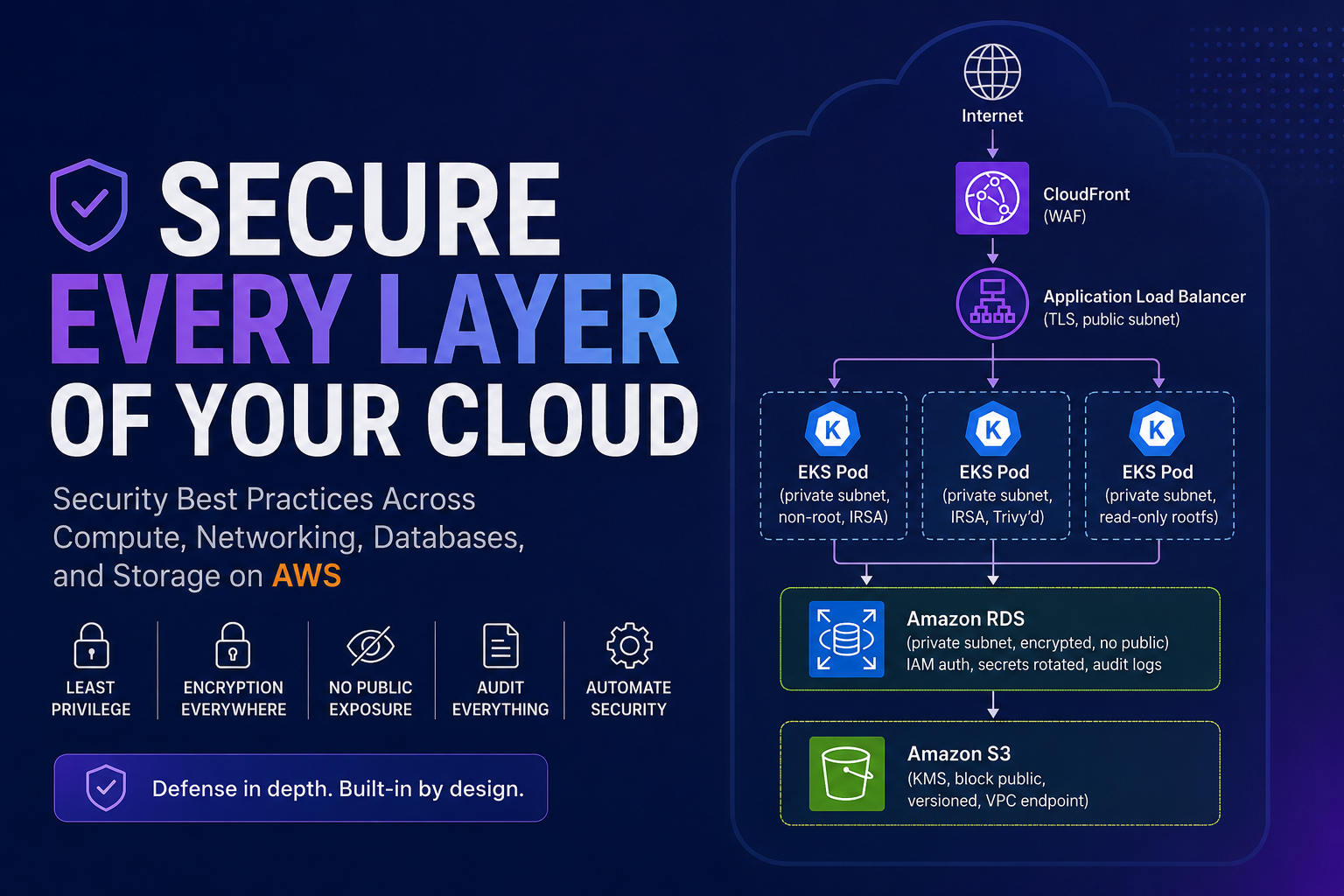
A practical guide for DevOps and Cloud Engineers preparing for interviews or securing production infrastructure.
Introduction
Security in the cloud isn’t a single checkbox — it’s a layered approach across every resource you manage. Whether you’re running containers on EKS, managing VPCs, operating RDS databases, or storing data in S3, the same core principles apply: least privilege, encryption everywhere, no public exposure of internal resources, audit everything, and automate security checks in your pipeline.
In this post, I’ll walk through the key security best practices across four pillars — Compute, Networking, Databases, and Storage — based on real-world experience running production microservices on AWS.
Compute Security (EKS / ECS / EC2)
Compute is where your application code runs. It’s also where attackers try to get a foothold. The goal: minimise the attack surface and limit what damage can be done if a workload is compromised.
Key Practices
-
IAM roles, not access keys — EC2 instances use instance profiles. EKS pods use IRSA (IAM Roles for Service Accounts). Never hardcode AWS credentials in code or environment variables.
-
Least privilege — each service gets only the permissions it needs. A proxy service that reads from S3 doesn’t need permission to delete DynamoDB tables.
-
Private subnets — workloads run in private subnets with no public IPs. Only the load balancer sits in a public subnet.
-
No SSH in production — use AWS SSM Session Manager instead of opening port 22. No SSH keys to manage, full audit trail in CloudTrail, no inbound security group rule needed.
-
Container image scanning — scan every image in your CI/CD pipeline before it reaches production. Tools: Trivy, ECR scan-on-push, Snyk. Block deployment on CRITICAL/HIGH CVEs.
-
Read-only root filesystem — run containers with
readOnlyRootFilesystem: true. If an attacker gets in, they can’t write malicious files or install tools. -
Non-root containers — never run as root inside the container. Set
runAsNonRoot: trueandrunAsUser: 1000in your pod security context. -
Pod security standards — enforce restricted policies via OPA Gatekeeper or Kyverno: no privileged containers, drop ALL Linux capabilities, no host network/PID sharing.
-
Secrets injection at runtime — pull secrets from AWS Secrets Manager or use External Secrets Operator. Never bake secrets into Docker images or ConfigMaps.
-
Patching and hardened AMIs — use minimal base images (distroless for containers, Amazon Linux 2023 for nodes). Rebuild AMIs weekly to pick up security patches.
Example Pod Security Context
securityContext:
  runAsNonRoot: true
  runAsUser: 1000
  readOnlyRootFilesystem: true
  allowPrivilegeEscalation: false
  capabilities:
    drop:
      - ALL
Networking Security (VPC / Security Groups / NACLs)
Networking is your first line of defence. A misconfigured security group can expose your entire database to the internet. The principle here is: deny by default, allow explicitly, and log everything.
Key Practices
- Security groups — least privilege — only open the exact ports needed between specific resources. Reference other security groups by ID, not broad CIDRs.
# ALB → App: only port 8080, only from ALB security group
ingress {
  from_port       = 8080
  to_port         = 8080
  protocol        = "tcp"
  security_groups = [aws_security_group.alb.id]
}
-
NACLs as defence in depth — use Network ACLs for broad subnet-level deny rules. They’re stateless (must allow both directions), but they’re useful for emergency IP blocks.
-
Private subnets for data tier — databases, caches, and internal services should never have public IPs. Not even temporarily.
-
VPC Flow Logs — enable on every VPC. Captures every network connection (accepted AND rejected). Send to S3 or CloudWatch for analysis.
-
No 0.0.0.0/0 ingress — never allow all-traffic inbound on any security group. Not even “just for testing.”
-
WAF on ALB/CloudFront — AWS WAF blocks SQL injection, XSS, bad bots, and rate-limits abusive clients at the edge — before traffic reaches your application.
-
TLS everywhere — encrypt all traffic in transit. TLS termination at the ALB, enforce SSL on database connections, mTLS between microservices if using a service mesh.
-
VPC endpoints — access AWS services (S3, DynamoDB, Secrets Manager, ECR) via private VPC endpoints. Traffic stays on the AWS backbone, never touches the public internet.
-
Network segmentation — separate VPCs or subnets for different environments (dev/staging/prod). Production resources should be unreachable from development networks.
Database Security (RDS / DynamoDB / Aurora)
Databases hold your most valuable asset: data. A breach here means customer PII, payment details, and business-critical information exposed. The bar is highest here.
Key Practices
-
Encryption at rest — enable KMS encryption on all databases. No exceptions. Use customer-managed keys for audit trail control.
-
Encryption in transit — enforce SSL/TLS connections. For RDS: set
rds.force_ssl = 1in the parameter group. Reject any unencrypted connection. -
No public access — databases sit in private subnets. The RDS instance has
publicly_accessible = false. Only the application security group can reach the DB port. -
Security group restriction — only the application layer’s security group is allowed to talk to the database on port 5432 (Postgres) or 3306 (MySQL). Nothing else.
-
IAM database authentication — where possible, use IAM authentication instead of static passwords. Pods generate temporary tokens via IRSA — no long-lived credentials.
-
Secrets rotation — use AWS Secrets Manager with automatic rotation (every 30 days). The application fetches credentials at runtime. If a credential leaks, it expires automatically.
-
Automated backups and PITR — enable point-in-time recovery. Backups encrypted with KMS. Test restores quarterly to verify they actually work.
-
Audit logging — enable database audit logs (RDS enhanced monitoring, Performance Insights). Know who queried what and when.
-
Deletion protection — enable
deletion_protection = trueon all production databases. Prevents accidentalterraform destroyor console mistakes.
Storage Security (S3 / EBS / EFS)
Storage is where data lives long-term. The biggest risk: accidental public exposure. One misconfigured S3 bucket policy has caused countless breaches globally.
Key Practices
- Block Public Access — enable S3 Block Public Access at the account level. This prevents any bucket in the account from ever being made public, regardless of individual bucket policies.
resource "aws_s3_account_public_access_block" "account" {
  block_public_acls       = true
  block_public_policy     = true
  ignore_public_acls      = true
  restrict_public_buckets = true
}
-
Encryption at rest — SSE-KMS encryption on all S3 buckets. EBS volumes encrypted by default (enable at the account level). EFS encrypted with KMS.
-
Bucket policies — least privilege — restrict access to specific IAM roles. Don’t use wildcards (
Principal: *) unless you truly intend public access (rare). -
Versioning — enable on all important buckets. Protects against accidental deletions and overwrites. You can always restore a previous version.
-
MFA Delete — for critical compliance data, require MFA to permanently delete objects. Even if credentials are compromised, the attacker can’t delete without the MFA device.
-
S3 access logs — enable server access logging or CloudTrail S3 data events. Know exactly who accessed which object and when.
-
Lifecycle policies — move old data to cheaper tiers (Glacier, Deep Archive) and expire objects you no longer need. Less data stored = smaller attack surface.
-
VPC endpoints for S3 — use a Gateway VPC endpoint so that S3 traffic from your VPC never traverses the public internet.
-
Object Lock (WORM) — for compliance data that must never be modified (financial records, audit logs), enable S3 Object Lock in Governance or Compliance mode.
Cross-Cutting Security (Applies to Everything)
Beyond the four pillars, these practices protect your entire AWS environment:
| Practice | What It Does |
|---|---|
| AWS CloudTrail | Audit trail of every API call across every account. Who did what, when, from where |
| AWS Config | Continuous compliance monitoring. Detects non-compliant resources automatically (e.g., unencrypted bucket created) |
| GuardDuty | Threat detection — identifies compromised credentials, crypto mining, port scanning, unusual API patterns |
| SCPs (Service Control Policies) | Organisation-level guardrails. Even account admins can’t bypass them. Block public RDS, restrict regions, deny IGW creation |
| Multi-account strategy | Separate accounts for prod, dev, security, networking. Blast radius isolation — a compromise in dev can’t reach prod |
| Tagging | Tag all resources with owner, team, environment. Security team can trace ownership instantly during incidents |
How This Looks in Practice (Example Architecture)
Internet → CloudFront (WAF) → ALB (TLS, public subnet)
                                    │
                    ┌────────────────┼────────────────┐
                    │                │                │
              ┌─────▼─────┐   ┌─────▼─────┐   ┌─────▼─────┐
              │ EKS Pod   │   │ EKS Pod   │   │ EKS Pod   │
              │ (private  │   │ (private  │   │ (private  │
              │  subnet,  │   │  subnet,  │   │  subnet,  │
              │  non-root,│   │  IRSA,    │   │  read-onl │
              │  IRSA)    │   │  Trivy'd) │   │  rootfs)  │
              └─────┬─────┘   └─────┬─────┘   └─────┬─────┘
                    │                │                │
              ┌─────▼────────────────▼────────────────▼─────┐
              │ RDS (private subnet, encrypted, no public,   │
              │       IAM auth, secrets rotated, audit logs)  │
              └──────────────────────────────────────────────┘
                    │
              ┌─────▼─────┐
              │ S3 (KMS,  │
              │  block    │
              │  public,  │
              │  versioned│
              │  VPC endpt│
              └───────────┘
Key Takeaway
Security isn’t one big thing — it’s many small things done consistently. The pattern repeats across every layer:
- Encrypt — at rest AND in transit
- Restrict access — least privilege, no public exposure
- Audit — log everything, know who did what
- Automate — scan in CI/CD, detect drift with Config, block non-compliant resources
- Isolate — separate environments, accounts, networks
If you follow these practices across compute, networking, databases, and storage, you’ll have a security posture that passes audits, withstands incidents, and lets you sleep at night.
Have questions or want to discuss further? Connect with me on LinkedIn.